Integrationen
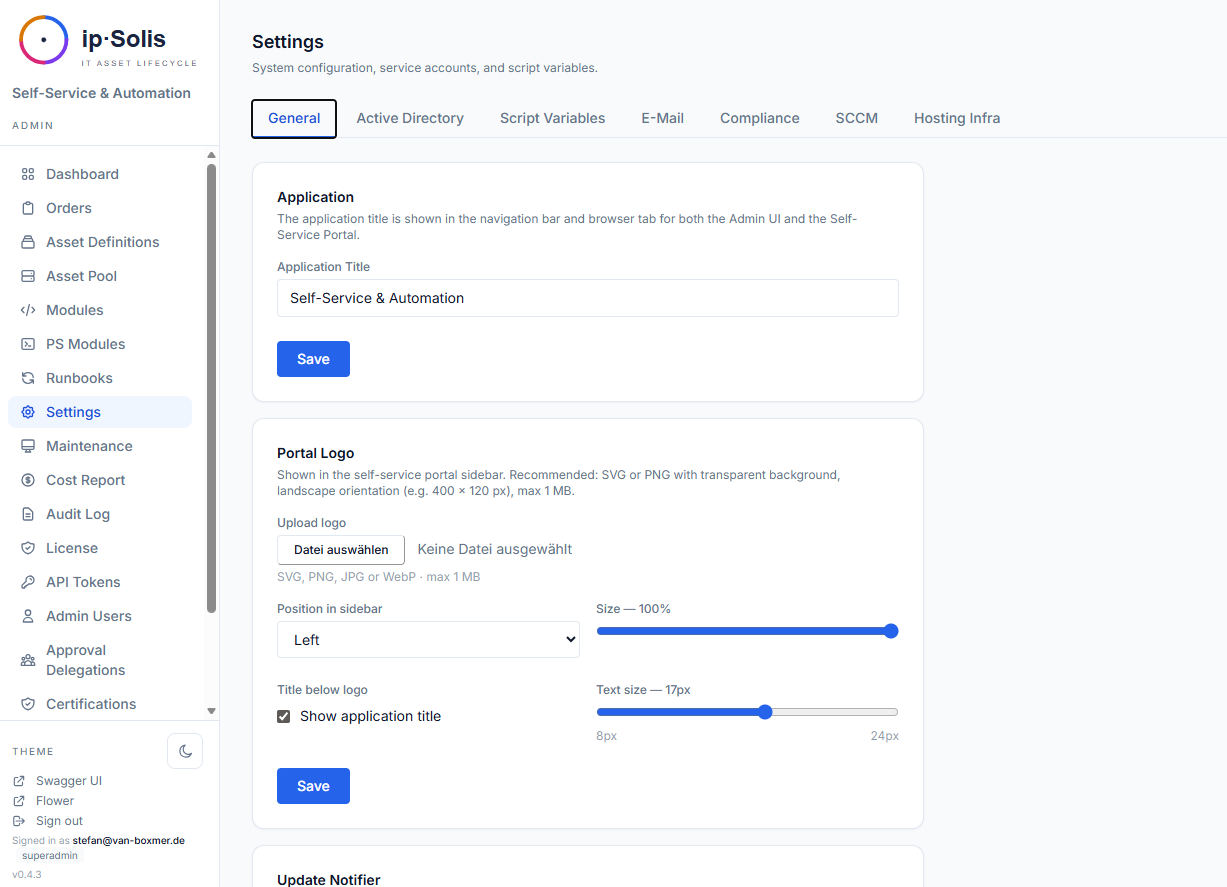
ip·Solis bindet sich an Ihre bestehende Infrastruktur an, anstatt sie zu ersetzen. Sämtliche Integrations-Zugangsdaten werden zur Laufzeit über Admin → Einstellungen konfiguriert und in der Tabelle app_config gespeichert — eine Neuerstellung des Containers ist beim Ändern von Zugangsdaten nicht erforderlich.
Active Directory / LDAP
Active Directory ist das Rückgrat der Benutzeridentität in ip·Solis. Es wird verwendet für:
- Benutzervalidierung — Bestätigung, dass das Konto eines Antragstellers existiert und aktiv ist
- Manager-Lookup — Ermittlung des Vorgesetzten des Antragstellers zur Genehmigungsweiterleitung
- Gruppenmitgliedschaft — Hinzufügen und Entfernen von Benutzern aus Gruppen als Teil von Runbook-Schritten und der Group-Access-Automatisierung
- Prüfung berechtigter Antragsteller — Verifizierung, dass ein Benutzer Mitglied einer eingeschränkten AD-Gruppe ist, bevor ein Antrag zugelassen wird
Konfiguration unter Admin → Einstellungen → Active Directory:
| Einstellung | Beschreibung |
|---|---|
| Server | LDAP-Server-Hostname oder -IP |
| Port | Standard: 389 (LDAP) oder 636 (LDAPS) |
| Bind DN / Passwort | Zugangsdaten des Dienstkontos |
| Base DN | Suchwurzel für Benutzer- und Gruppen-Lookups |
| Auth-Typ | NTLM oder Kerberos (NTLM-Signierung unterstützt) |
| Consumer-Attribute | AD-Feldnamen für department, cost_center, company, employeeID, title |
Portal-SSO — OpenID Connect (OIDC)
Die Portal-Anmeldung nutzt standardbasiertes OpenID Connect. Sie registrieren einen oder mehrere Identity-Provider (jeder kompatible IdP — Microsoft Entra ID, Okta, Ping, Google, Keycloak, Authentik, Zitadel, …); jeder konfiguriert sich selbst aus dem Discovery-Dokument seines Issuers. Ob überhaupt ein Login erforderlich ist, steuert Login zum Zugriff auf das Portal erforderlich (siehe Self-Service → Authentifizierung).
Provider hinzufügen unter Admin → Einstellungen → Authentifizierung → OIDC Providers. Je Provider:
| Einstellung | Beschreibung |
|---|---|
| Provider ID | Kleinbuchstaben-Slug (a–z0-9_-), erscheint in der Callback-URL; nach Anlage nicht änderbar |
| Anzeigename | Erscheint in der Login-Auswahl (z. B. „Entra ID") |
| Issuer-URL | Der IdP-Issuer; Discovery wird aus <issuer>/.well-known/openid-configuration gelesen (Entra: https://login.microsoftonline.com/<tenant>/v2.0, Okta: https://<org>.okta.com, Google: https://accounts.google.com) |
| Client-ID / Secret | Aus der IdP-App-Registrierung |
| Redirect-URI | Wird aus dem Portal-Host als /portal/auth/<provider>/callback abgeleitet — genau diese URI in der IdP-App registrieren |
| Domänen-Allowlist | Optionale kommaseparierte UPN-/E-Mail-Domänen-Allowlist |
Verwenden Sie Test an einem Provider, um vor dem Speichern zu prüfen, ob dessen Discovery-Dokument erreichbar ist. On-Prem-LDAP-Anmeldung (Benutzername/Passwort) kann zusätzlich zu OIDC angeboten werden (auth.ldap_enabled).
Entra-ID-Gruppenprovisionierung — Microsoft Graph *(Pro)*
Über die Entra-ID-Anmeldung (OIDC oben) hinaus kann ip·Solis Mitgliedschaft in Entra-(Cloud-only-)Sicherheitsgruppen als Zugriffsziel provisionieren — für M365-/Cloud-only-Kunden ohne On-Prem-AD. Ein Asset-Typ mit einem entra_group-Zugriffsziel gewährt/entzieht die Mitgliedschaft bei Bestellung und Widerruf, genau wie eine AD-Gruppe.
Konfiguration unter Admin → Einstellungen → Compliance → Entra-Gruppenprovisionierung:
| Einstellung | Beschreibung |
|---|---|
| Tenant-ID / Client-ID | Eine dedizierte App-Registrierung (getrennt von der OIDC-Anmelde-App) |
| Client-Secret | Als Secret gespeichert; Secret-Store-Referenzen werden unterstützt |
Die App-Registrierung benötigt die Anwendungsberechtigungen GroupMember.ReadWrite.All + User.Read.All (mit Admin-Zustimmung). Am Asset-Typ ist der Gruppen-identifier die Objekt-ID (GUID) der Entra-Gruppe. Grant/Revoke sind idempotent und werden im selben Order-Change-Log wie AD-Gruppen erfasst. Mit Anmeldedaten testen prüfen Sie den Client-Credentials-Flow.
SCIM 2.0 *(Pro)*
ip·Solis stellt unter /scim/v2/* einen vollständigen **Joiner-/Mover-/Leaver-**SCIM-2.0-Endpunkt bereit — ein Drop-in-Provisionierungsziel für Okta, SailPoint und Ping.
Leaver (immer aktiv):
DELETE /scim/v2/Users/{id}— löst die vollständige Leaver-Verarbeitung ausPATCH/PUT /scim/v2/Users/{id}mitactive=false— löst die vollständige Leaver-Verarbeitung aus
Joiner (Opt-in, scim.joiner_enabled): Ein SCIM-Create (POST /Users) — oder eine Reaktivierung — mappt die SCIM-Attribute des Benutzers (Core + Enterprise-Extension: department, costCenter, employeeNumber, organization, title) auf ip·Solis-Attribute, wertet Ihre Zuweisungsregeln aus und bestellt die passenden Bundles. Idempotent — bereits vorhandene Asset-Typen werden übersprungen.
Mover (scim.mover_mode): Bei einer Attribut-Änderung (PUT-Replace oder PATCH) wertet ip·Solis die Regeln gegen die neuen Attribute neu aus und gleicht die Berechtigungen ab:
disabled— Attribut-Änderungen werden ignoriertadditions_only— neu berechtigte Bundles bestellen; nie widerrufenreconcile— Additions plus Widerruf von Berechtigungen, die nicht mehr passen
Der Auto-Revoke ist strikt auf regel-/SCIM-provisionierte Zugriffe beschränkt; Self-Service- und manuell erstellte Bestellungen werden nie automatisch widerrufen. Da ip·Solis keinen lokalen Benutzerspeicher hat, nutzt das Mover-Diffing eine minimale Last-Seen-Identitätsprojektion (scim_identities), die bei jedem SCIM-Write gepflegt wird.
Listenfilter: GET /Users?filter= unterstützt die vollständige Grammatik nach RFC 7644 §3.4.2.2 — Vergleichsoperatoren eq ne co sw ew gt ge lt le, Präsenz pr, logisch and / or / not und geklammerte Gruppierung. Ein fehlerhafter Filter liefert 400 invalidFilter.
Gruppen: /Groups ist ein Read-Only-Shim (leere Liste) — ip·Solis modelliert Gruppen-Mitgliedschaft im Active Directory, nicht in SCIM.
Authentifizierung: Erstellen Sie unter Admin → API-Token ein Token mit den Scopes scim:read + scim:write und fügen Sie es in den IdP-Konnektor ein. Joiner / Mover aktivieren Sie unter Einstellungen → Compliance → SCIM.
Siehe Lifecycle & Asset-Pool → HR-Leaver-Flow für das Leaver-Verhalten und Onboarding-Bundles für die Regel-Engine.
HR-Leaver-Webhook *(Pro)*
Ein speziell entwickelter Webhook unter POST /hr/leaver für HR-Systeme, die Kündigungsereignisse übermitteln. Nativ unterstützt für Workday, SAP SuccessFactors, Microsoft Graph sowie ein generisches ip·Solis-eigenes Format.
Authentifizierung: gescopetes API-Token (Scope hr:leaver) oder HMAC-SHA256-Body-Signierung mit WEBHOOK_SECRET_TOKEN.
Siehe Lifecycle & Asset-Pool → HR-Leaver-Flow für Payload-Formate und die vollständige Dokumentation.
ServiceNow-Webhook *(Pro)*
ip·Solis kann Bestellauslöse-Anfragen von ServiceNow (oder jedem HTTP-fähigen Workflow-Tool) über einen eingehenden Webhook unter POST /webhook/servicenow empfangen. Der Webhook erstellt eine Bestellung und löst sofort das passende Runbook aus — von ServiceNow ausgehende Bestellungen durchlaufen dieselben Genehmigungs-Workflows, Kapazitätsprüfungen, Runbooks und denselben Audit-Trail wie Portal-Bestellungen.
Authentifizierung
Es werden zwei Authentifizierungswege unterstützt. Beide sind für sich ausreichend; beide können koexistieren.
Bearer-Token (empfohlen für neue Integrationen)
Erstellen Sie unter Admin → API-Token ein benanntes API-Token mit dem Scope webhook:in. Übergeben Sie es im Authorization-Header:
Authorization: Bearer xpat_…
Bearer-Token sind einzeln über die Admin-UI widerrufbar, ohne den laufenden Container anzufassen oder ein gemeinsames Secret zu rotieren.
HMAC-SHA256-Signatur (Legacy / Abwärtskompatibilität)
Konfigurieren Sie ein gemeinsames Secret unter Admin → Einstellungen → ServiceNow (Umgebungsvariable WEBHOOK_SECRET_TOKEN). Signieren Sie den rohen Request-Body mit HMAC-SHA256 und senden Sie das Ergebnis als:
X-Hub-Signature-256: sha256=<hex-digest>
Dies ist das GitHub-kompatible Body-Signierungsformat. Sind beide Header vorhanden, hat Bearer Vorrang.
Request-Format
Endpunkt: POST /webhook/servicenow
Content-Type: application/json
Payload-Felder
| Feld | Typ | Erforderlich | Beschreibung |
|---|---|---|---|
servicenow_ref |
string | ✓ | ServiceNow-RITM-Nummer (z. B. RITM0012345). Wird als Idempotenzschlüssel verwendet — ein zweiter POST mit demselben Wert gibt 409 Conflict zurück. |
snow_req |
string | — | ServiceNow-REQ-Nummer (z. B. REQ0009876). Wird zur Querverweisbildung im Bestelldetail und im Audit-Log gespeichert. |
action |
string | ✓ | "provision" oder "delete". Bestimmt, welches Runbook ausgelöst wird. |
user_email |
string (E-Mail) | ✓ | E-Mail-Adresse des Benutzers, dem das Asset zugewiesen wird. |
user_name |
string | ✓ | Anzeigename des Benutzers (verwendet in Benachrichtigungen und der Bestell-UI). |
owner_email |
string (E-Mail) | — | Falls das Asset einen abweichenden Eigentümer hat (z. B. im Auftrag einer anderen Person bestellt), dessen E-Mail. Standardwert ist user_email, falls weggelassen. |
owner_name |
string | — | Anzeigename des Eigentümers. |
asset_type_name |
string | ✓ | Exakter Name des Asset-Typs, wie in ip·Solis konfiguriert (z. B. "Standard VDI"). Gibt 400 zurück, wenn nicht gefunden. |
requested_from |
ISO-8601-Datumzeit | ✓ | Beginn des Zuweisungszeitraums (z. B. "2026-06-13T00:00:00Z"). |
requested_until |
ISO-8601-Datumzeit | ✓ | Ende des Zuweisungszeitraums / Ablaufdatum. |
rdp_users |
Array von Strings | — | Zusätzliche RDP-Benutzer, denen Zugriff gewährt wird. Gilt nur für Asset-Typen mit aktiviertem allow_user_lists. |
admin_users |
Array von Strings | — | Zusätzliche Admin-Benutzer, denen Zugriff gewährt wird. Gleiche Einschränkung wie rdp_users. |
config |
object | — | Freiform-Key/Value-Map für benutzerdefinierte Asset-Attribute, die am Asset-Typ definiert sind. Schlüssel müssen mit dem Attributfeld key der Asset-Definition übereinstimmen. Werte werden als config-JSON der Bestellung gespeichert und sind in Runbook-Schritten als Kontextvariablen $PARAMS.attr_<key> zugänglich. |
Beispiel-Request
curl -X POST https://ipsolis.example.com/webhook/servicenow \
  -H "Authorization: Bearer xpat_abc123..." \
  -H "Content-Type: application/json" \
  -d '{
    "servicenow_ref": "RITM0012345",
    "snow_req": "REQ0009876",
    "action": "provision",
    "user_email": "jane.doe@example.com",
    "user_name": "Jane Doe",
    "asset_type_name": "Standard VDI",
    "requested_from": "2026-06-13T00:00:00Z",
    "requested_until": "2026-07-13T00:00:00Z",
    "config": {
      "project_code": "EU-FINANCE-2026",
      "cost_center": "CC-4400"
    }
  }'
Response
Bei Erfolg gibt der Endpunkt 201 Created mit der neu erstellten Bestellung als JSON zurück:
{
  "id": 312,
  "servicenow_ref": "RITM0012345",
  "snow_req": "REQ0009876",
  "action": "provision",
  "status": "processing",
  "user_email": "jane.doe@example.com",
  "user_name": "Jane Doe",
  "owner_email": null,
  "owner_name": null,
  "asset_type_id": 3,
  "assigned_asset_id": null,
  "rdp_users": [],
  "admin_users": [],
  "requested_from": "2026-06-13T00:00:00Z",
  "requested_until": "2026-07-13T00:00:00Z",
  "celery_task_id": "a3f2c1d0-84e7-4b91-bc2e-9f1a0e5d3c88",
  "config": {
    "project_code": "EU-FINANCE-2026",
    "cost_center": "CC-4400"
  },
  "error_message": null,
  "created_at": "2026-06-13T21:07:00Z",
  "updated_at": "2026-06-13T21:07:01Z",
  "steps": []
}
Bemerkenswerte Felder in der Response:
| Feld | Hinweise |
|---|---|
id |
ip·Solis-Bestell-ID — verwenden Sie diese, um den Bestellstatus über GET /orders/{id} abzufragen |
status |
"processing" nach dem Auslösen; "pending_approval", wenn der Asset-Typ eine Genehmigung erfordert, bevor das Runbook läuft |
assigned_asset_id |
null zum Erstellungszeitpunkt bei capacity_pooled-Typen — wird vom Runbook befüllt, sobald ein Asset zugewiesen ist |
celery_task_id |
Celery-Task-UUID — in Flower zur Fehlersuche sichtbar |
steps |
Leer bei Erstellung; wird während der Runbook-Ausführung befüllt |
Die Bestellung ist bereits an den Worker ausgeliefert, wenn die Response eintrifft.
Kapazitäts- und Kontingentprüfungen
Bei action: provision erzwingt ip·Solis dieselben Vorabprüfungen wie bei Portal-Bestellungen, bevor irgendetwas erstellt wird:
- Pool-Kapazität — wenn der Asset-Typ
capacity_pooledist und ein Pool-Größenlimit hat, wird die Anfrage mit429abgelehnt, sobald keine Kapazität verfügbar ist. - Kontingent pro Benutzer — wenn
max_per_useram Asset-Typ gesetzt ist, wird die Anfrage mit429abgelehnt, falls der Benutzer bereits so viele aktive Instanzen hält.
Idempotenz
servicenow_ref ist ein eindeutiger Schlüssel. Das erneute Einreichen derselben RITM-Nummer gibt zurück:
HTTP 409 Conflict
{"detail": "Order with servicenow_ref 'RITM0012345' already exists"}
Dies ermöglicht ServiceNow, eine fehlgeschlagene Webhook-Zustellung gefahrlos erneut zu versuchen, ohne doppelte Bestellungen zu erzeugen.
Fehlerreferenz
| Status | Ursache |
|---|---|
400 Bad Request |
asset_type_name in ip·Solis nicht gefunden |
401 Unauthorized |
Fehlende oder ungültige Authentifizierung (kein Bearer-Token und keine gültige HMAC-Signatur) |
403 Forbidden |
Bearer-Token vorhanden, aber ohne Scope webhook:in |
409 Conflict |
servicenow_ref existiert bereits (doppelte Zustellung) |
422 Unprocessable Entity |
Payload-Validierungsfehler (fehlendes Pflichtfeld, ungültige E-Mail usw.) |
429 Too Many Requests |
Pool-Kapazität oder Kontingent pro Benutzer überschritten |
Audit-Trail
Jede per Webhook erstellte Bestellung erscheint unter Admin → Audit-Log mit triggered_by gesetzt auf entweder webhook:token:<token-name> (Bearer-Pfad) oder webhook:hmac (HMAC-Pfad), wodurch ServiceNow-gesteuerte Bestellungen auf einen Blick von Portal- und API-Bestellungen unterschieden werden können.
VMware vSphere
vSphere-VM-Lebenszyklusoperationen werden über PowerCLI-Skripte ausgeführt, die im Skriptmodul-Speicher abgelegt sind (Kategorie: vmware). Der Worker-Container führt pwsh (PowerShell 7 unter Linux) mit vorkonfiguriertem SSL-Zertifikats-Bypass für selbstsignierte vCenter-Zertifikate aus.
Konfiguration unter Admin → Einstellungen → VMware vSphere:
| Einstellung | Beschreibung |
|---|---|
| vCenter-Server | Hostname oder IP |
| Benutzername / Passwort | Dienstkonto mit VM-Verwaltungsberechtigungen |
vSphere-Operationen (Ein-/Ausschalten, Klonen, Löschen, Rekonfigurieren) sind als Skriptmodule implementiert, die aus Runbook-Schritten heraus aufgerufen werden. Fügen Sie diese Skripte den Runbooks Ihres Asset-Typs unter Admin → Asset-Definitionen → Runbooks hinzu.
XenServer / XCP-ng
XenServer- und XCP-ng-VM-Lebenszyklusoperationen folgen demselben Muster wie vSphere — PowerShell-Skripte, die als Skriptmodule abgelegt sind (Kategorie: xenserver) und über pwsh im Worker-Container ausgeführt werden.
Konfiguration unter Admin → Einstellungen → XenServer/XCP-ng:
| Einstellung | Beschreibung |
|---|---|
| XenServer-Host | Hostname oder IP des Pool-Masters |
| Benutzername / Passwort | XenAPI-Zugangsdaten |
SSL-Zertifikatsabfragen werden über stdin-Injektion automatisch beantwortet, sodass Skripte bei nicht vertrauenswürdigen Zertifikaten nicht hängenbleiben.
SCCM *(Pro)*
Die SCCM-Integration ermöglicht automatisierte OS-Deployment-Workflows:
- Task-Sequence-Trigger — Starten einer SCCM-Task-Sequence für ein bestimmtes Gerät
- Geräteanlage (in SCCM) — Anlegen eines Computerdatensatzes in SCCM über die AdminService-REST-API (Kerberos-Authentifizierung). Dies ist ein ausgehender Schreibvorgang während der Provisionierung; ip·Solis liest/importiert derzeit keine bestehenden Geräte aus einer SCCM-Collection in den Asset-Pool.
- Gerätelöschung — Entfernen eines Computerdatensatzes nach der Außerbetriebnahme
- Status-Polling — der Celery-Workflow
sccm_probefragt SCCM nach dem Abschlussstatus der Task-Sequence ab und versetzt den Bestellstatus entsprechend weiter
Konfiguration unter Admin → Einstellungen → SCCM:
| Einstellung | Beschreibung |
|---|---|
| SCCM-Server | Hostname des Site-Servers |
| AdminService-URL | https://<server>/AdminService/v1.0 |
| Kerberos-Principal | UPN des Dienstkontos |
| Kerberos-Passwort | Passwort des Dienstkontos |
SMTP
Alle transaktionalen E-Mails (Genehmigungsbenachrichtigungen, Erinnerungen, Ablaufwarnungen, Leaver-Benachrichtigungen, Health-Alerts) werden über Pythons smtplib versendet.
Konfiguration unter Admin → Einstellungen → SMTP:
| Einstellung | Beschreibung |
|---|---|
| Host / Port | SMTP-Serveradresse und -Port |
| Benutzername / Passwort | SMTP-Authentifizierungs-Zugangsdaten |
| From-Adresse | In E-Mails angezeigte Absenderadresse |
| TLS-Modus | STARTTLS oder SSL/TLS |
| Reply-to | Optionale Reply-to-Adresse für Genehmigungs-E-Mails |
Verwenden Sie Test-E-Mail senden, um die Verbindung vor dem Speichern zu verifizieren.
Authentifizierungs-Optionen
ip·Solis spricht reines SMTP (STARTTLS/SSL + Benutzername/Passwort). Das ist bewusst provider-agnostisch — es funktioniert mit jedem Mailsystem, nicht nur mit Microsoft oder Google — sodass Sie unabhängig von Ihrem Identity-Provider nur eine SMTP-Konfiguration pflegen. ip·Solis nutzt keine herstellerspezifischen Versand-APIs (z. B. Microsoft Graph), die einen zweiten, nur für Microsoft gültigen Konfigurationspfad bedeuten würden.
Wie Sie sich authentifizieren, hängt von Ihrer Mailplattform ab:
| Szenario | Empfohlenes Vorgehen |
|---|---|
| Dedizierter/interner SMTP-Server oder ein Mail-Relay (SES, SendGrid, Mailgun, interner Postfix-/Exchange-Smarthost) | Benutzername + API-Key/Passwort des Relays direkt verwenden. Empfohlen — das Relay übernimmt die provider-spezifische Auth, ip·Solis behält eine einfache SMTP-Konfiguration. |
| Microsoft 365 mit aktivierter MFA | Ein App-Kennwort für ein dediziertes Service-Postfach erstellen und als SMTP-Passwort verwenden. Funktioniert heute, beachten Sie aber den Hinweis unten. |
| Google Workspace mit Bestätigung in zwei Schritten | Ein App-Kennwort für ein dediziertes Service-Konto erstellen und als SMTP-Passwort verwenden. |
Hinweis zu Microsoft 365: App-Kennwörter setzen das legacy per-user MFA voraus und sind bei aktivierten Security Defaults nicht verfügbar; zudem baut Microsoft Basic Auth für SMTP schrittweise ab. Für ein zukunftssicheres M365-Setup richten Sie ip·Solis auf ein SMTP-Relay / einen Mail-Connector aus (Option 1 oben), statt sich direkt mit einem App-Kennwort gegen
smtp-mail.outlook.comzu verbinden. So bleibt ip·Solis auf einem provider-agnostischen SMTP-Pfad, und die M365-spezifische Auth liegt beim Relay, wo sie hingehört.
Token-basiertes SMTP (XOAUTH2) und herstellerspezifische Versand-APIs sind bewusst nicht
implementiert: Sie erfordern provider-spezifische Token-Verarbeitung und eine zweite
Konfigurationsfläche — bei geringem Mehrwert gegenüber einem Relay.
Chat-Benachrichtigungen — Microsoft Teams & Slack *(Pro)*
Genehmigungsanfragen (und Erinnerungen) können parallel zur E-Mail an Microsoft Teams und/oder Slack gesendet werden. Beide tragen denselben kanal-agnostischen Ein-Klick-Genehmigungslink (ein signiertes Token — der Genehmiger entscheidet ohne Portal-Login), sodass eine Anfrage gleichzeitig per E-Mail, Teams und Slack ankommen kann.
| Kanal | Einstellung | Zustellung |
|---|---|---|
| Teams | teams.mode + Workflows-Webhook-URL |
Adaptive Card (mit @Mention des Genehmigers, damit Teams eine echte Benachrichtigung auslöst) |
| Slack | slack.mode + Incoming-Webhook-URL |
Block-Kit-Nachricht |
Beide konfigurieren Sie unter Admin → Einstellungen (Teams- und Slack-Karten), jeweils mit einem Test-senden-Button. Sie laufen unabhängig — das Aktivieren von Slack beeinflusst Teams nicht, und keiner ersetzt die E-Mail. Dieselben Kanäle tragen auch Zertifizierungs- und Kostenschwellen-Benachrichtigungen.
Externe Secret-Backends
Ersetzen Sie Klartext-Zugangsdaten in app_config durch Referenzen auf einen externen Secret-Manager. ip·Solis löst Referenzen beim Lesen auf, mit einem prozesslokalen Cache mit 60-Sekunden-TTL.
Die Auflösung ist opt-in pro Zugangsdatum: ein als Klartext eingetragener Wert bleibt Klartext; nur als Referenz gespeicherte Werte werden aufgelöst. Sie gilt für jedes zur Laufzeit gelesene Integrations-Credential — Active Directory, SMTP, SCCM, OIDC sowie die Teams-/Slack-Webhooks. Sie gilt nicht für Admin-Login-Konten: deren Passwörter liegen als Einweg-Hash vor (nie im Klartext), es gibt also nichts zu externalisieren.
Unterstützte Backends:
| Backend | Referenzformat |
|---|---|
| HashiCorp Vault | vault://<path>[#<field>] |
| CyberArk CCP/AIM | ccp://[<safe>/]<object> |
| Azure Key Vault | azurekv://<vault>/<secret> |
| AWS Secrets Manager | awssm://<secret-id>[#<field>] |
| CyberArk Conjur | conjur://<identifier>[#<field>] |
Reine String-Werte funktionieren unverändert weiter, sodass Sie eine Zugangsdaten-Referenz nach der anderen migrieren können.
Vault-Authentifizierung: statisches Token, AppRole (role_id + secret_id) oder Kubernetes-JWT.
Azure-KV-Authentifizierung: Azure-AD-Service-Principal (unabhängig von der Entra-ID-SSO-Konfiguration).
AWS-Authentifizierung: statische IAM-Schlüssel oder natives sts:AssumeRole mit automatischer Session-Erneuerung.
Bulk-Migrationstool: Einstellungen → Compliance → Externes Secret-Backend → Klartext-Secrets ins Backend migrieren durchläuft alle Zeilen mit is_secret=true, überträgt die Klartextwerte an das aktive Backend und ersetzt sie durch Referenzen. Enthält eine Dry-Run-Vorschau und einen zeilenweisen Bericht.
API-Token
Pro-Integration benannte API-Token ersetzen den einzelnen gemeinsamen X-Admin-Key durch individuell widerrufbare, ablaufende, gescopete Bearer-Token.
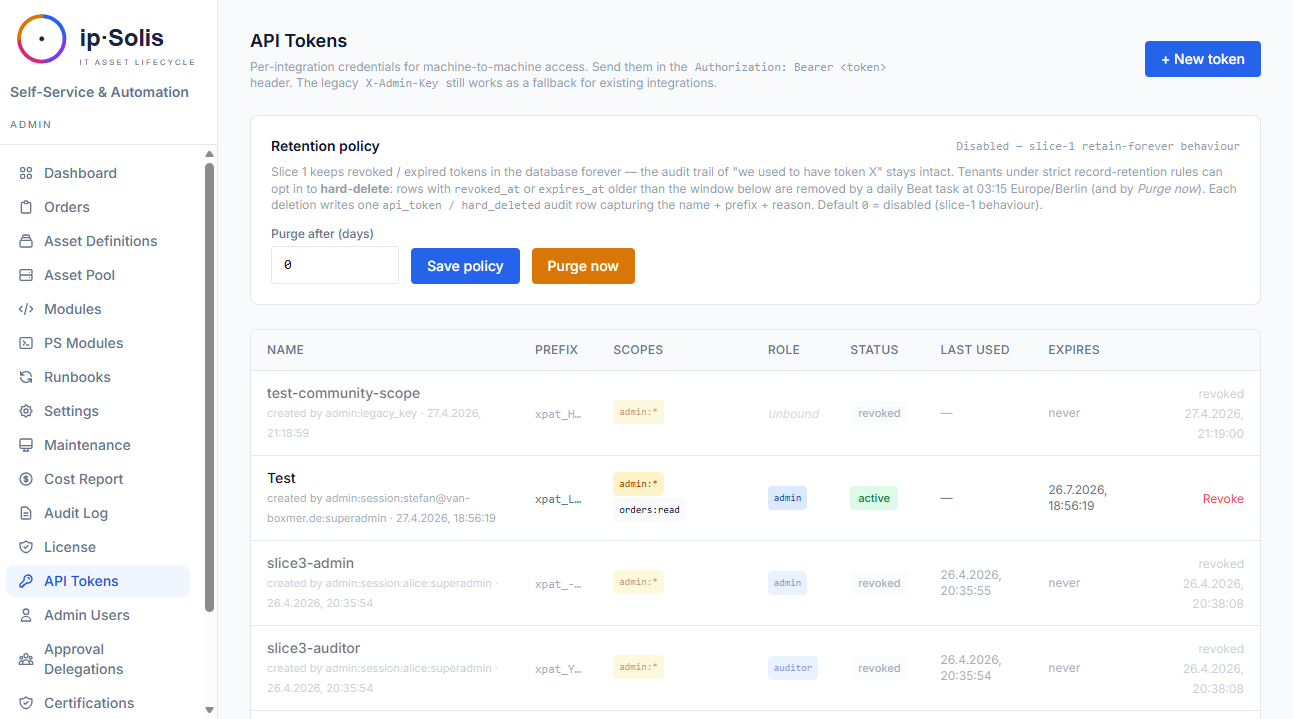
Token werden als SHA-256-Hashes gespeichert. Das rohe Token (xpat_…) wird bei der Erstellung einmalig angezeigt und kann nicht wiederhergestellt werden — behandeln Sie es wie ein Passwort.
Scopes
| Scope | Zugriff |
|---|---|
admin:* |
Vollständiger Admin-API-Zugriff |
admin:read |
Nur-Lese-Admin-Zugriff |
orders:write |
Bestellungen über die REST-API erstellen |
webhook:in |
Den eingehenden ServiceNow-Webhook aufrufen (POST /webhook/servicenow) |
hr:leaver |
Den HR-Leaver-Webhook aufrufen |
scim:read |
SCIM-GET-Operationen |
scim:write |
SCIM POST/PUT/PATCH/DELETE (löst Leaver-Flow aus) |
Rollenbindung
Token können mit einer bestimmten Rolle ausgegeben werden (superadmin, admin, approver, auditor, helpdesk). Rollengeschützte Routen erzwingen sowohl Scope als auch Rolle. Ein Ersteller kann nur Token bis zu seiner eigenen Rolle ausgeben — keine Rechteausweitung.
Hard-Delete-Aufbewahrung
Eine optionale tägliche Aufgabe (api-token-purge-daily) löscht Token endgültig (Hard-Delete), deren revoked_at oder expires_at älter ist als api_tokens.purge_after_days. Standard ist 0 (unbegrenzt aufbewahren). Jeder Hard-Delete erzeugt eine Audit-Zeile.
Legacy-`X-Admin-Key`
Der ursprüngliche X-Admin-Key-Header funktioniert weiterhin als virtuelle Superadmin-Zugangsdaten, sodass bestehende Integrationen beim Upgrade nicht abbrechen. Es wird empfohlen, für neue Integrationen auf benannte API-Token zu migrieren.