FinOps & Costs
ip·Solis includes a built-in cost tracking and chargeback engine. Every asset type can be priced, and the cost report aggregates active orders into projected monthly spend per cost center — giving IT finance teams the data they need for internal chargeback, forecasting, and budget enforcement.
Cost Model
Set cost fields on each asset type in Admin → Asset Definitions → [type] → Cost:
| Field | Description |
|---|---|
monthly_cost |
Projected monthly cost for one instance of this asset type |
currency |
ISO 4217 currency code (e.g., EUR, USD, GBP) |
cost_center |
The cost center that bears the charge for this asset type |
The cost model is intentionally simple: one flat monthly rate per asset type. This covers the majority of IT chargeback scenarios without requiring a complex billing engine.
Cost Report
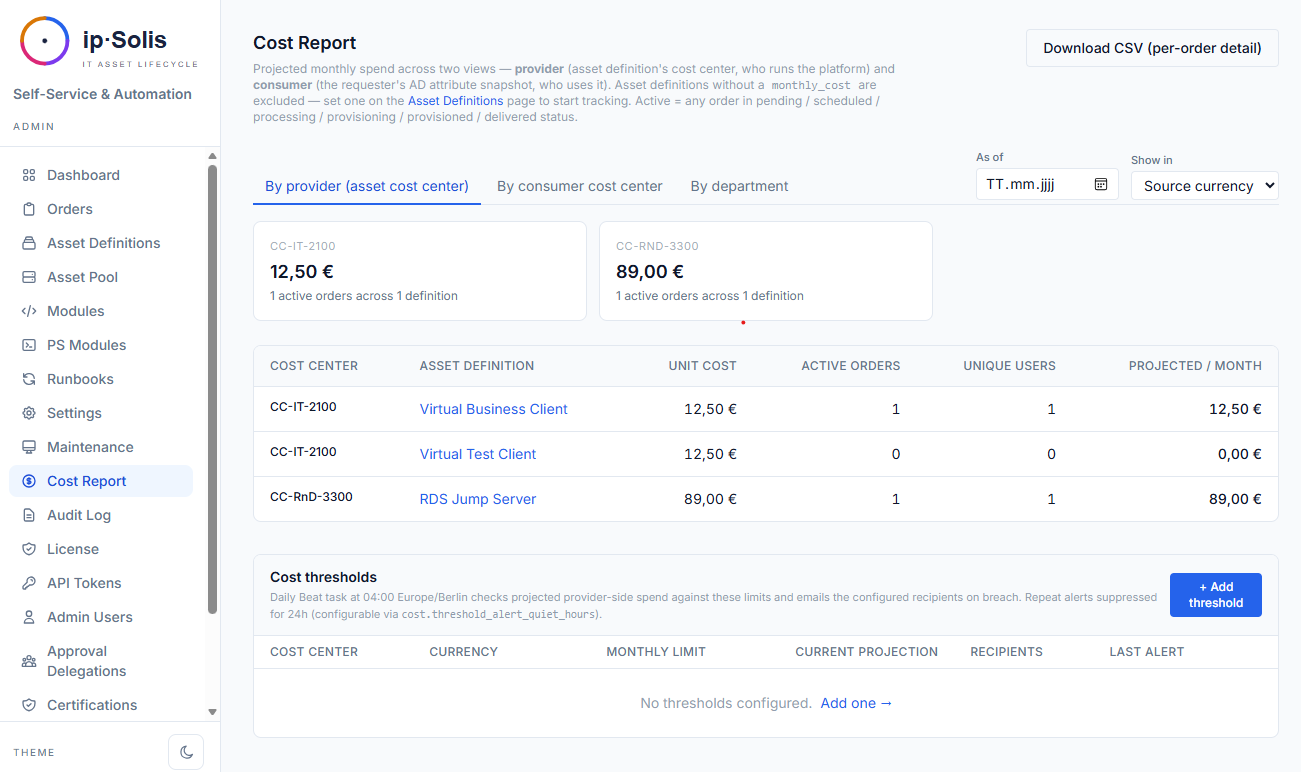
The cost report at Admin → Cost Report aggregates all active orders into a projected monthly spend summary. It shows:
- Total projected spend per cost center
- Per-provider breakdown — spend by asset type within each cost center
- Consumer breakdown — spend sliced by the requester's department, cost center, company, and employee ID (snapshotted from AD at order creation time)
- CSV export — full per-order breakdown for spreadsheet pivots
The consumer breakdown relies on an AD attribute snapshot taken at order creation. The snapshot captures department, cost_center, company, employeeID, and title (attribute names are configurable in Settings → Active Directory → Consumer attributes). This means the report reflects who placed each order even if the user's AD attributes change later.
Per-Order Cost Projection
When an asset type has a monthly_cost configured, the portal's order form shows the projected total before the user submits. The calculation is monthly_cost × months_requested and appears in the Access & Duration card. This gives requesters visibility into cost before committing to an order.
Software Licenses & Contracts *(Pro)*
Beyond a made-up per-seat monthly_cost, ip·Solis can track the real vendor contract behind an asset type. A contract (vendor, product, contract value, billing interval, licensed seats, renewal date, notice period) binds one contract to many asset types.
When a type is bound to a contract, the cost report prices each active order at the contract's per-seat rate — contract value ÷ billing interval ÷ seats — instead of the flat monthly_cost. Consumption is the sum of active orders across all bound types, which drives:
- Utilization — seats consumed vs. licensed
- Shelfware — unused seats × seat price (money paid for capacity nobody uses)
- Over-allocation — more active orders than licensed seats (surfaced, never blocks ordering)
This is Model A — actual consumption is charged back; unused capacity is reported, not spread across consumers. Manage contracts and see live utilization under Reports → Licenses & Contracts; bind an asset type to a contract on its definition form.
A daily opt-in renewal-reminder emails when a contract enters its renewal_date − notice_period_days window, so you never miss a cancellation deadline.
FX Conversion
When asset types are priced in different currencies, the cost report can convert everything to a single canonical reporting currency.
Configure in Admin → Settings → FinOps:
| Config key | Example | Description |
|---|---|---|
cost.fx.canonical |
EUR |
The reporting currency all costs are converted to |
cost.fx.rates |
{"USD": 0.92, "GBP": 1.18} |
Static exchange rates relative to the canonical currency |
With FX enabled, the cost report gets a Show in currency selector that converts summary cards via cross-rates to a single figure per cost center. Asset types without a configured rate surface in a warning banner so operators know which currencies are excluded from the totals.
Historical Snapshots
A daily Celery Beat task (cost-report-snapshot-daily) at 02:00 captures the current state of all cost report views into the cost_report_snapshots table. This enables retrospective analysis — answering questions like "what was our projected spend in March?" without losing the active-order data that only exists as a live moment in time.
The cost report page gains an As of date picker that reads from the snapshot table for past dates. When no snapshot exists for a selected date (e.g., before snapshots were enabled), the report falls back to live data.
Configure snapshot retention with cost.snapshot_retention_days (default: 365 days).
Cost Threshold Alerts
Operators can define monthly spend ceilings per (cost_center, currency) pair. When the projected monthly spend for a cost center crosses a threshold, ip·Solis sends an email alert to the configured recipients.
Configure thresholds on the Cost Report page via Manage Thresholds.
Hysteresis: the cost.threshold_alert_quiet_hours setting (default: 24 hours) prevents repeated alerts when spend is hovering just above the threshold. Once an alert fires, the clock resets. Editing a threshold clears the alert clock so the next breach re-alerts immediately.
Teams notifications — when Microsoft Teams integration is enabled, threshold alerts are also delivered as an Adaptive Card to the configured channel.
Dashboard indicators — cost center provider totals cards on the report are highlighted in red when they are in breach, so the situation is visible at a glance without waiting for an email.
The Celery Beat task cost-threshold-alerter runs daily at 04:00 (Europe/Berlin).
ServiceNow-Driven Orders
Orders dispatched via the ServiceNow webhook (POST /webhook/servicenow) go through the same AD attribute snapshot at creation time, so they appear in the consumer breakdown on the cost report alongside portal and API-originated orders. No separate configuration is required.