Security
ip·Solis is designed for environments where IT governance matters. Access control is layered: a five-tier admin role ladder controls what each operator can see and do, per-asset-type ACL grants scope individual admins to specific asset types, and separation-of-duties enforcement prevents the same person from both configuring and approving access to an asset type.
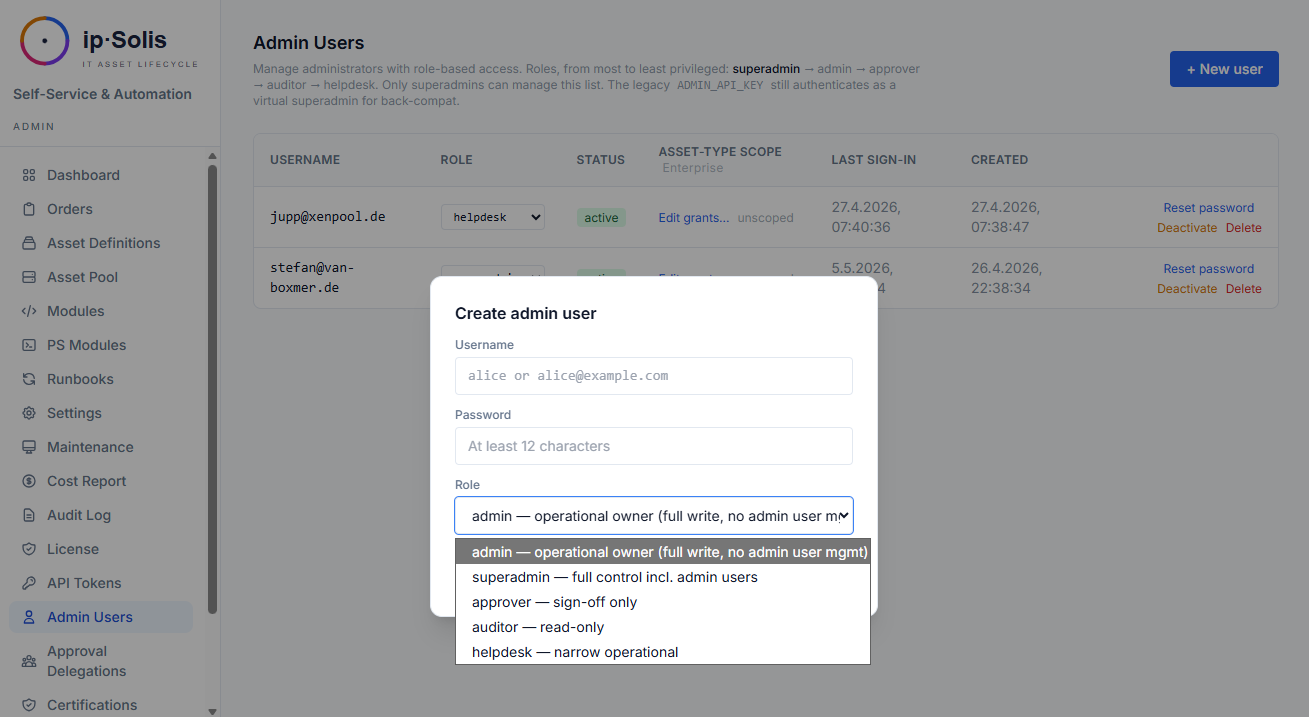
Admin Role Ladder
ip·Solis has five built-in admin roles, ordered from most to least privileged:
| Role | Capabilities |
|---|---|
superadmin |
Full access. Manages admin users, licenses, API tokens, seed export, and initial setup. Self-protection guards prevent losing the last active superadmin |
admin |
Operational access: asset types, runbooks, pool management, orders, configuration, approval delegations, module management, maintenance |
approver |
Can approve or decline pending orders. Read-only access to orders and asset types |
auditor |
Read-only access to audit log, cost report, leaver events, certifications. No write operations |
helpdesk |
Read-only access to orders and the asset pool. Can view order details and step logs |
First-Run Setup
When the admin_users table is empty (fresh deployment), ip·Solis auto-prompts for the first superadmin account on the login page. After the superadmin is created, the prompt disappears.
Password Storage
Admin passwords are hashed with PBKDF2-SHA256 at 600,000 iterations using Python's standard library — no external dependency on bcrypt or passlib.
Self-Service Password Change
Every admin user can rotate their own password at My Account (/ui/my-account). The current password is required as a liveness check. The new password must differ from the current and be at least 12 characters.
Legacy X-Admin-Key actors (virtual superadmin via the environment variable) cannot use this page and are directed to rotate via .env.
Each password change produces an audit row (password_changed_self) with no value content — the fact of the change is recorded, but neither old nor new password values appear in the audit trail.
Password Policy
Operators can enforce a minimum password length and account lockout policy for admin accounts:
| Config key | Description |
|---|---|
security.password_min_length |
Minimum password length (enforced on set and change) |
security.lockout_attempts |
Failed login attempts before lockout |
security.lockout_duration_minutes |
How long an account stays locked after too many failures |
Configure in Admin → Settings → Security.
Per-Asset-Type ACL Grants
Scope individual admin users to a subset of asset types. When an admin has at least one ACL grant, they enter "scoped mode":
- The admin UI asset type list shows only their granted types
PUT,DELETE, and clone operations on out-of-scope types return404(same shape as a missing ID — the existence of unrelated teams' types is not leaked)- The API behaves identically to the UI — scoping is enforced at the route level, not just in templates
Zero grants = back-compat "see all" behaviour, so single-team installs are not affected.
Auto-grant on create: when a scoped admin creates a new asset type, the grant is added automatically so they don't lose visibility on their own creation.
superadmin, approver, auditor, and helpdesk always bypass scoping — only the admin role is subject to ACL grants.
Manage grants in Admin → Users → [user] → Asset Type Access.
Separation of Duties
An admin who configured an asset type cannot also approve access requests against it. This prevents a single person from both defining what is granted and deciding who gets it.
Detection: on every approval action, ip·Solis walks the audit log for rows where the approver (matched by email, local-part, or admin username) created, updated, or cloned the asset type in question.
Enforcement: if a match is found, the approval request returns HTTP 409 with the original configuration audit row quoted back. The approval row stays pending so a different approver can decide.
Declines: the check only fires on approve actions. Declining your own configured asset type is always allowed.
Bearer Token Authentication
Named API tokens replace the global X-Admin-Key with individually managed, revocable, expiring credentials. See Integrations → API Tokens for full documentation.
Role Binding
API tokens may be issued with a specific role in addition to their scopes. A token with admin:* scope but auditor role is blocked from write operations — the most restrictive of scope and role wins.
Mint guard: a creator can only issue tokens at or below their own role. An admin cannot mint a superadmin token.
Legacy X-Admin-Key
The original ADMIN_API_KEY environment variable continues to authenticate as a virtual superadmin via the X-Admin-Key request header. This ensures existing automation and integrations continue to work after upgrading to RBAC. It is recommended to migrate to named API tokens for new integrations.
The legacy key is attributed as admin:legacy_key in the audit trail, so it remains auditable even without a named account.
Portal Security
The self-service portal has its own security model separate from the admin UI:
- SSO enforcement — when Entra ID mode is enabled, unauthenticated requests are redirected to Microsoft login
- Server-side identity — all portal mutations use the server-side verified Entra identity, never a client-supplied value
- Leaver blocking — users flagged as leavers via HR webhook or SCIM are blocked from placing new orders immediately, even if their Entra account is still active
- Delegation integrity — a user can only configure delegation for their own approvals; the server enforces this regardless of what the client submits
- Signed approval tokens — one-click approve/decline links use time-limited HMAC-signed tokens; they cannot be forged or reused
Webhook Security
All inbound webhooks (ServiceNow, HR leaver) validate X-Hub-Signature-256 HMAC-SHA256 signatures using WEBHOOK_SECRET_TOKEN. The validation uses hmac.compare_digest to prevent timing attacks.
The HR leaver webhook additionally accepts scoped bearer tokens (hr:leaver scope) as a preferred alternative to HMAC, so the secret can be rotated independently per integration.
Deployment Security Notes
- All secrets (AD bind password, SMTP password, Entra client secret, vSphere/XenServer/SCCM credentials) are stored in the
app_configtable and never written to.envor baked into images .envcontains only infrastructure secrets (database URL, Redis URL, admin API key, webhook token) — the minimum required to start the containers- Secret-typed
app_configrows are never included in audit log before/after diffs - External secret backend references (Vault, CyberArk, Azure KV, AWS SM, Conjur) allow replacing all
app_configsecrets with vault references — no plaintext credentials at rest - The Nginx reverse proxy terminates TLS before traffic reaches FastAPI; plain HTTP is only used on the internal Docker network